
10 Best WordPress Websites: Technical Analysis 2026

Collections of “best WordPress sites” often boil down to screenshots and a list of themes. This is a weak guide for businesses: a beautiful first screen says nothing about publishing speed, content structure, SEO, integrations, updates and support costs.
In this article, we look at 10 strong WordPress projects as engineering solutions. The first five are large sites that WordPress VIP shows in a public showcase and cases. The remaining five are implemented NBM-IT cases. For everyone, not only the design is important, but also the type of task: corporate website, media, catalog, subscription service or local services.
This is not a ranking based on traffic, awards or budget. This is a practical selection of architectural patterns that you can apply in your project. If you are still choosing a CMS, start with comparison WordPress and 1C-Bitrix. There we analyze the choice of platform. Here is how to technically make a strong WordPress site after such a choice.
For examples without reference to a CMS, there is a selection best corporate websites. This article is intentionally narrow: it answers the queries “best WordPress sites,” “examples of WordPress sites,” and “how a modern WordPress site works.”
What technical criteria were used to select the examples?
A good WordPress site does not have one “correct” architecture. A corporate storefront does not need headless just because it is fashionable, and for highly loaded media it is not enough to simply install a caching plugin. Therefore, in the selection we look at six practical criteria.
| Criterion | What we check | Why is this important |
|---|---|---|
| Rendering model | Regular theme, block theme, headless or hybrid | Determines the rate of change, front-end, cost and integration capabilities |
| Content model | Services, cases, products, authors, categories, locations as separate entities | Prevents the site from becoming a collection of unrelated pages |
| Editorial process | Templates, blocks, roles, preview, moderation | The marketer publishes content faster and does not break the layout |
| Productivity | Cache, images, fonts, third-party scripts, LCP, INP and CLS measurement | Speed impacts visitor experience, advertising, conversion and search visibility |
| Safety and Operation | Updates, backups, access rights, monitoring, rollback plan | The site remains supported after launch |
| Search architecture | Indexed pages, canonical, pagination, Sitemap, schema.org | The search engine understands the structure and does not waste crawling on duplicates and service URLs |
It is on this matrix that it is worth comparing contractors and technical proposals. “We’ll install WordPress in three days” doesn’t answer any of these questions on its own.
Quick choice: which example to look at for your task
| If you need | Look first | What to take into the project |
|---|---|---|
| Corporate website of a B2B company | Carnegie Stone, Just an Accountant | Separate content types for services and cases, a form next to the product, stable SEO templates |
| Corporate media or knowledge base | Salesforce News, TechCrunch, FrameOut Magazine | Categories, authors, publication templates, internal navigation and editorial roles |
| Complex product catalog | Carnegie Stone | Custom characteristics fields, filtering, gallery, request for calculation instead of simulating a cart |
| Service with personal account and payment | TeleCola US | Separation of the marketing showcase and the client’s secure circuit, integration and error monitoring |
| Local services and SEO | Titan Cleaning | Service pages, intent map, calculator, application tracking and protection against duplicate landings |
| High load media | Al Jazeera, Rolling Stone | Component content model, CDN, caching, independent frontend only when really necessary |
10 Strong WordPress Websites
Examples for a corporate website, media, catalog and service
1. The White House
A reference point for a site with a lot of responsibility: clear scenarios, a calm visual hierarchy and quick access to key information.
2. Salesforce News
A good example of the content section of a large company: clear headings, strong announcements and a structure convenient for the editors and readers.
3. Al Jazeera
Shows how WordPress works as an editorial loop in a complex digital product: front-end, mobile scripts and content publishing do not interfere with each other.
4. TechCrunch
A useful benchmark for media and SaaS blogs: high publishing frequency, strong topic navigation, and subscription model on one platform.
5. Rolling Stone
An example of expressive media design, where large photography and typography do not interfere with quickly finding the material, topic or author.
6. Carnegie Stone
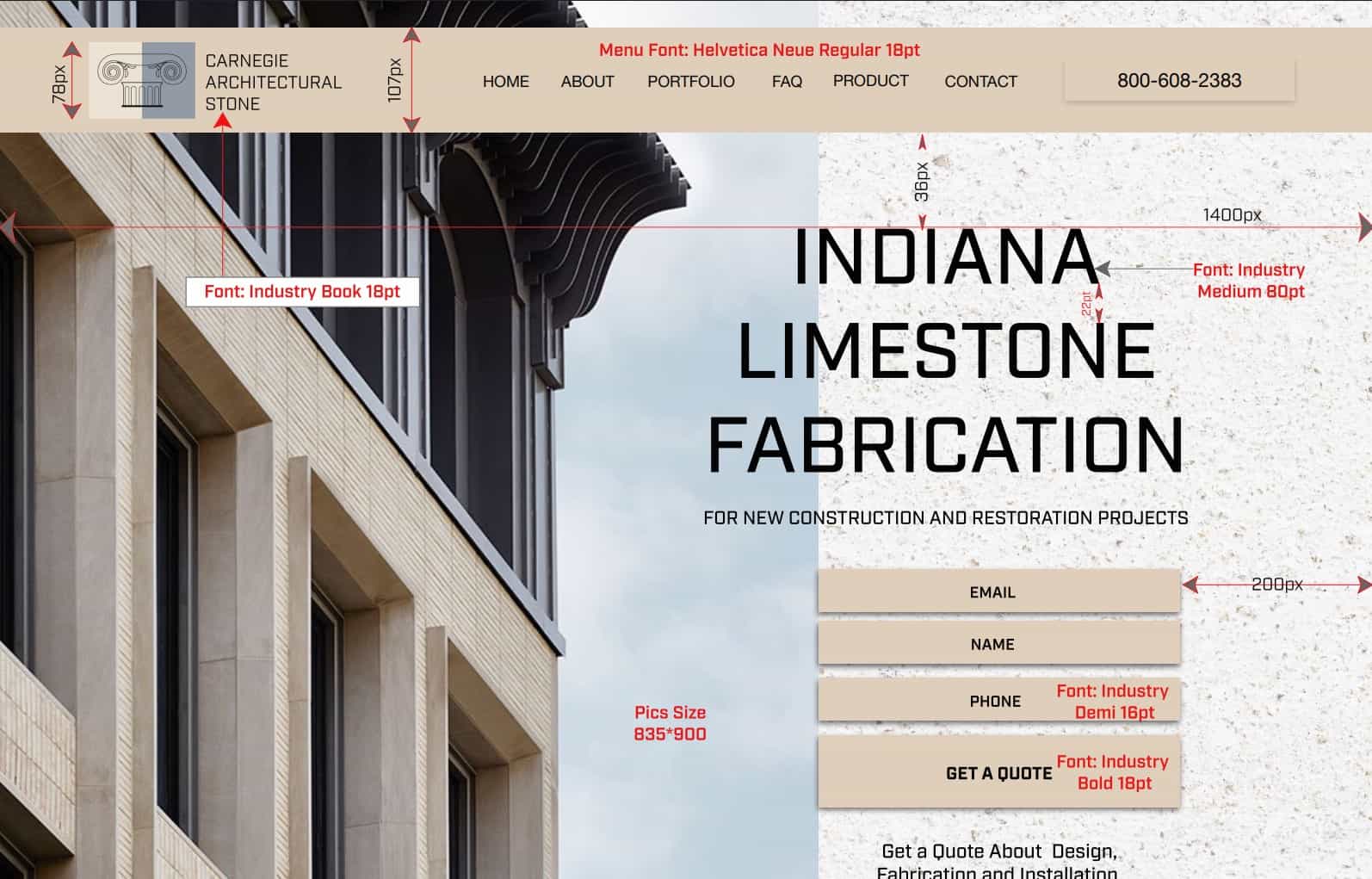
Custom WordPress theme for a decorative stone manufacturer: catalog, project gallery, application forms and basic SEO structure.

7. TeleCola US
WordPress portal for subscriptions: content pages, personal account, online payment and renewal scenarios without manual processing of each request.
8. FrameOut Magazine
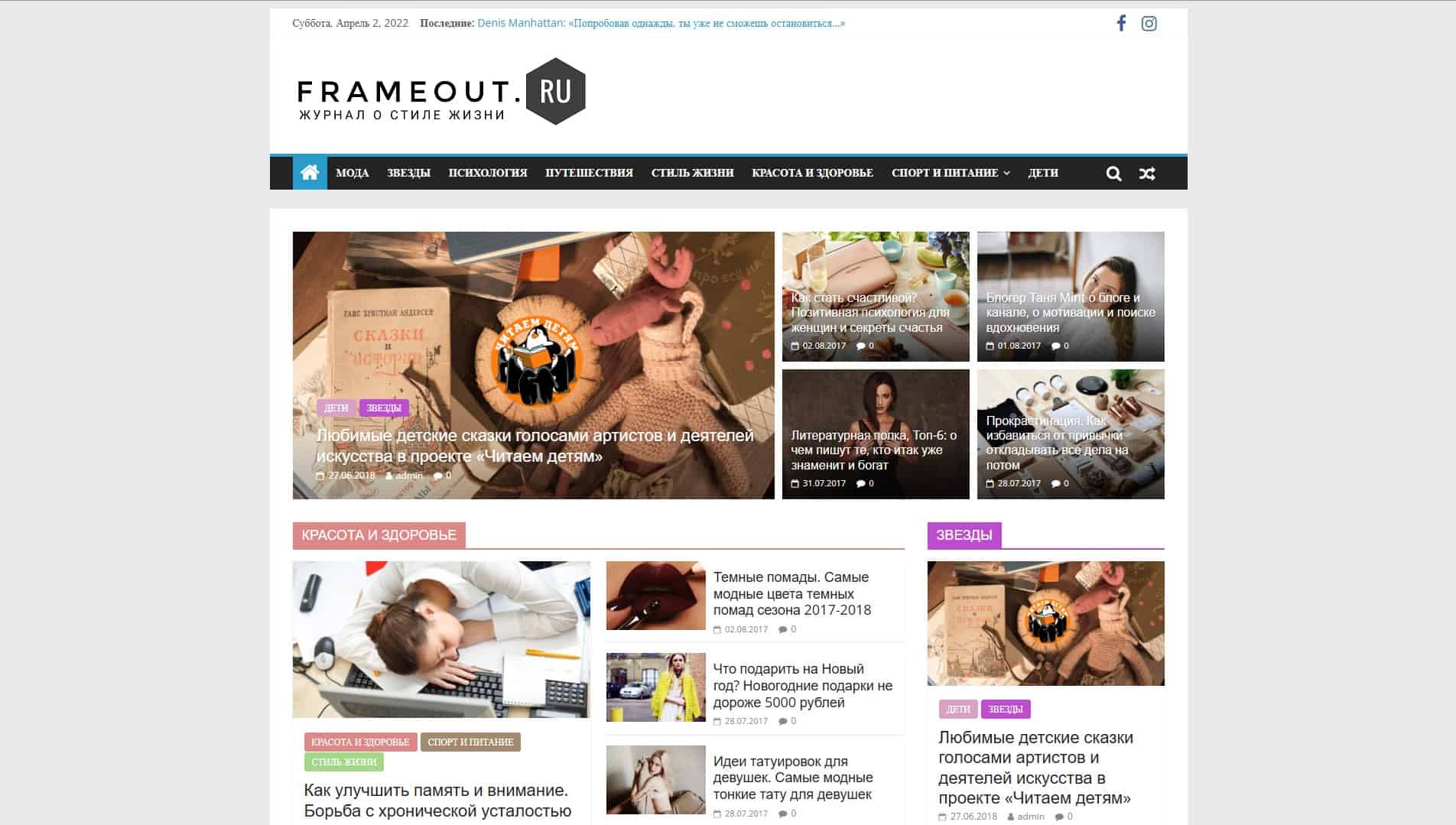
Multi-level media on WordPress: categories, tags, authors, visual selections and an editorial process, convenient for regular release of materials.
9. Just an accountant
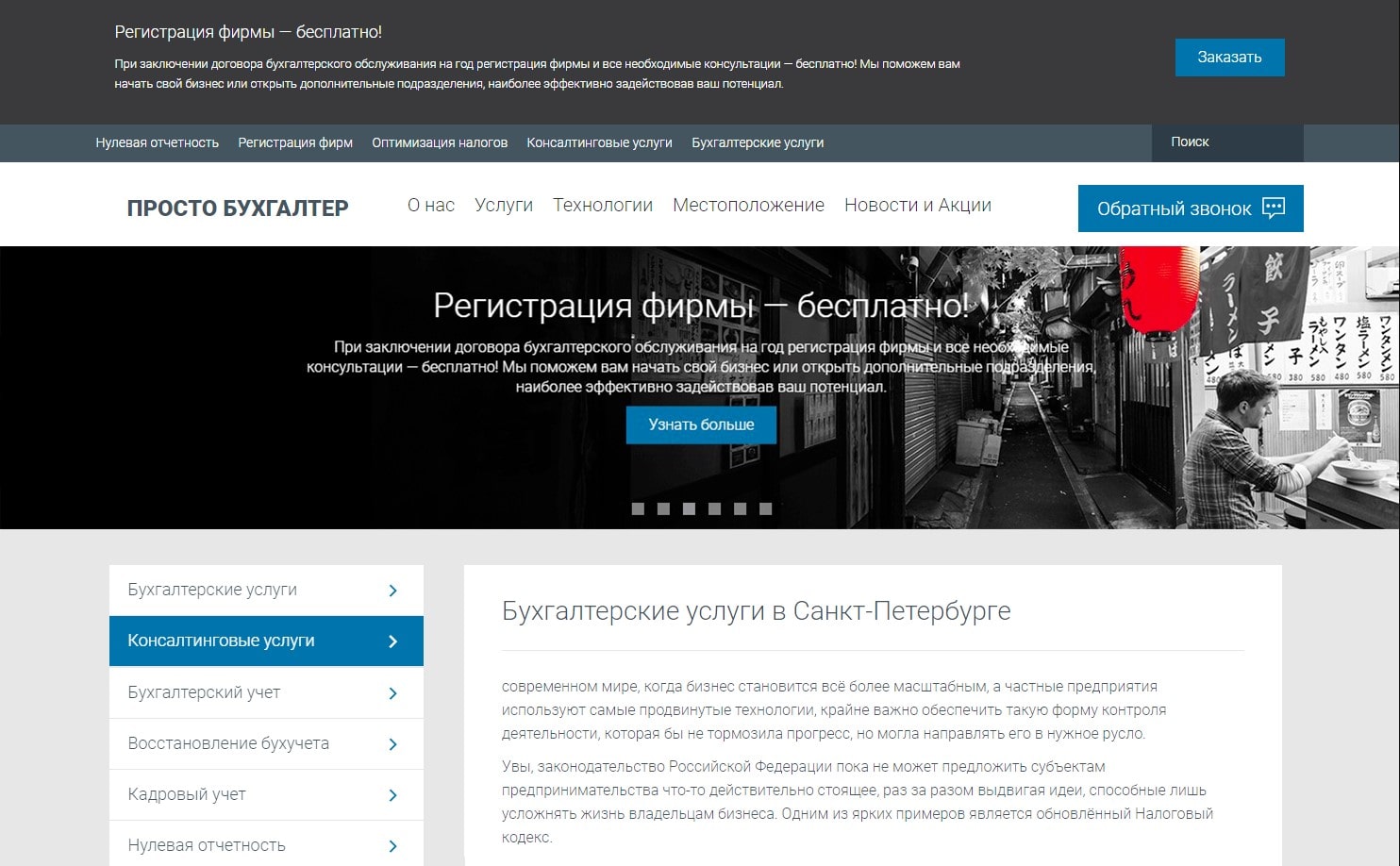
Multi-page WordPress site for an accounting company: separate services, clear offer, quick forms and preparation for SEO promotion.
10. Titan Cleaning
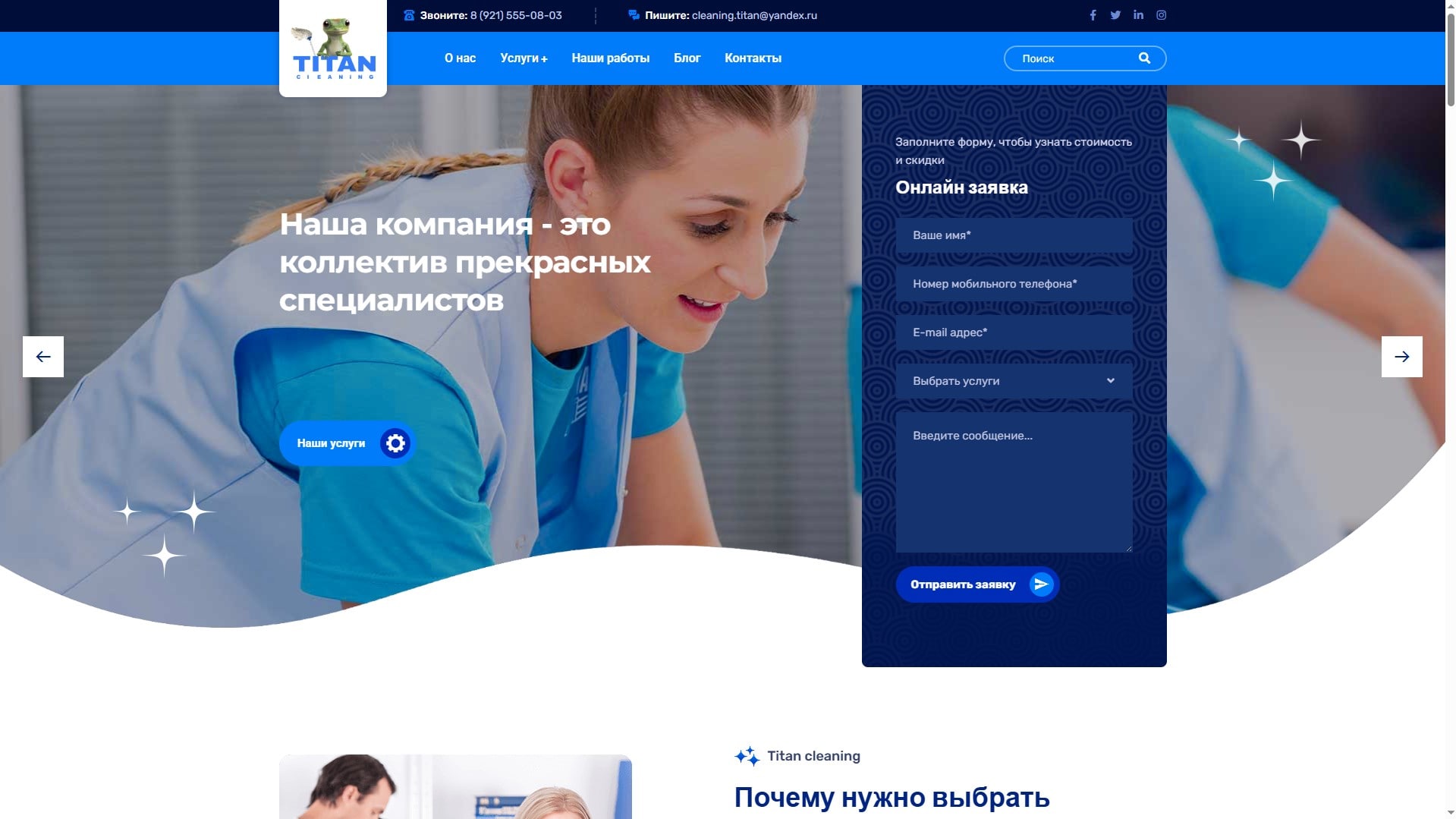
Website for a cleaning company on WordPress with a calculator, landing pages for services and a local SEO structure that helps to receive applications from searches.
What is technically useful to understand about these 10 sites?
1. The White House: Predictable Structure for Critical Information
The White House included in the public showcase of large WordPress sites. From a technical point of view, this is a useful guide for organizations whose website is simultaneously a public source of information, an archive of materials, and a channel for different audiences.
What to take for a corporate project:
- fix the information architecture before design: sections, content owners, page types and their life cycle;
- make key sections accessible without a multi-level menu;
- use repeatable blocks and templates instead of manually laying out each news;
- Do not mix press releases, services, documents and application forms in one template.
This approach is especially important for B2B, legal and healthcare companies. The site should be understandable both on the first visit and when a company employee updates it a year after its launch.
2. Salesforce News: Content Model, Not a News Section
Salesforce News shows how enterprise content can become a product in its own right. The technical basis here is not in “pretty cards”, but in taxonomy: the material is associated with a topic, format, author, business line and other entities.
For a WordPress project this usually means:
- create separate post types for news, cases, research and events;
- use categories and tags only where they help the user and search;
- set each post type to its own metadata template, Open Graph and schema.org;
- exclude internal search, technical filtering pages and empty archives from the index.
When the content model is designed in advance, the editor does not copy an old page to “make another one.” It creates an entity with the correct fields, and the site itself collects the template, cards, breadcrumbs and linking.
3. Al Jazeera: headless WordPress only for a measurable task
Al Jazeera is a good example of WordPress as a content loop in headless architecture. In the published case, WordPress VIP describes a combination: WordPress for editorial, a GraphQL layer and a separate React application for the frontend.
The conclusion is not that “everyone needs headless.” For a services site, a classic or block theme is often faster to launch, cheaper to maintain, and easier on SEO. Headless is justified when there are at least several conditions:
- one content must serve a website, personal account, application or several storefronts;
- frontend requires a non-standard interface or high independence from WordPress templates;
- there is a team that is ready to support API contracts, caching and monitoring of two applications;
- the benefit of the architecture is measurable and not a bullet point in a contractor's presentation.
The WordPress REST API gives structured access to data via JSON, so it can be connected to React, Node.js, a mobile application, or a back-end service. Public data remains public, and access to private entities requires authentication and correct rights. This is described in the official REST API Handbook.
4. TechCrunch: publish, subscribe and editorial speed
TechCrunch useful for media, SaaS companies and expert blogs. WordPress VIP publicly discussed the development of a subscription product based on the existing WordPress architecture, and not replacing the CMS for the sake of one function.
Technical conclusions for a small project:
- articles, authors, topics and subscription pages should have separate templates;
- paywall, forms and external widgets cannot be connected without measuring the impact on speed;
- It is better to collect related materials by category, tags and manual connections, rather than a random list from recent publications;
- Analytical events should be described before launch: article viewing, scrolling, subscription, transition to a service, application.
A common mistake is to develop a blog separately from your business. It is much more useful to connect the material with a consultation, case or service, but only where it is natural for the topic of the article.
5. Rolling Stone: design system and repeatable blocks
Rolling Stone proves that a WordPress project can have a strong visual character and not depend on the unique layout of each page. For publishing brands, Penske Media WordPress VIP describes the move to the general block editor Gutenberg.
Practical lesson: a brand does not need a “collection of beautiful sections”, but a limited design system. It has color tokens, typography, padding, card templates, and a set of valid blocks. Then the new material retains its style, and the speed of publication does not depend on the developer.
In modern themes it is convenient to set this via theme.json: The file configures global styles, available block controls, templates and template parts. WordPress notes that these settings are reflected in both the frontend and the editor, so this is a good way to reduce the discrepancy between the layout and the admin. More details in the official manual theme.json.
6. Carnegie Stone: B2B catalog on a custom WordPress theme
In the NBM-IT case Carnegie Stone WordPress solves the problem of a decorative stone manufacturer. This is not an online store “just in case,” but a B2B catalog in which the client needs to look at the material, application examples, characteristics and send a request.
Technical model for such a site:
- a separate type of content for products and a separate one for completed projects;
- custom fields for characteristics, materials, files and galleries;
- filtering, which is based on real selection parameters, and not on arbitrary tags;
- application form with transfer of source, page and selection parameters to CRM;
- controlled map of indexed URLs: categories and cards - yes, technical filters - no.
For manufacturers, this is usually more profitable than a universal theme with dozens of extra modules. A custom template can be made more compact, faster and more understandable to the editor.
7. TeleCola US: boundaries between display and product
NBM-IT case TeleCola US - WordPress portal for content, subscriptions, payments and personal account. In such projects, the most dangerous mistake is to try to store all the business logic inside one theme and change it without testing.
What we design separately:
- public pages, SEO landing pages and news;
- client account and authorization;
- payments, renewals, access statuses and webhooks;
- error log and reprocessing of unsuccessful operations;
- access rules and fallback scenario for support.
WordPress can be a convenient marketing and editorial layer. But payments, external APIs and content access must have a clear contract, logging and process owner.
8. FrameOut Magazine: Editorial Media You Can Support
FrameOut Magazine Shows the basic but often overlooked WordPress media architecture: categories, authors, content, tags, images, search and regular publishing.
For such a project, what is more important is not the number of plugins, but the content discipline:
- a limited set of sections with separate hubs;
- tags only for persistent topics, and not for every word in the article;
- single image template: dimensions, crop,
alt, file weight and fallback; - links from the article to related materials and to the thematic hub;
- archives, author pages and pagination with correct canonical and metadata.
This model helps both editorial and SEO. The search engine sees topic clusters, and the user can continue reading on one subject rather than looking for the next article from scratch.
9. Just an Accountant: WordPress Services Website and Managed Leads
Case "Just an accountant" - an example of a multi-page WordPress site for services. It is especially important not to make one overloaded main one, but to build a clear path from a specific service to a consultation.
On a technical level this includes:
- separate templates and metadata for services, industries, cases and articles;
- form parameters: page, service, UTM, source and consent to data processing;
- protecting the form from spam without degrading the user scenario;
- successful sending event in analytics and CRM;
- a clear rule about which page is canonical for each commercial intent.
This gives the business not a “lead from the site”, but the normal context of the lead: what service he came from, what he saw and where to send the request.
10. Titan Cleaning: Local SEO as part of the data model
In the case Titan Cleaning A WordPress site is associated with search engine promotion services. In local SEO, the weak point is usually not the CMS, but duplicates: dozens of city pages with almost the same text, indexed filters and the lack of understandable commercial pages.
It is more correct to build like this:
- describe the real matrix “service x territory x type of object”;
- create only those landing pages that have their own benefits, prices, conditions or cases;
- enter canonical and
noindexfor service pages, sortings and weak combinations; - generate sitemap from final canonical URLs;
- check that the payment form, telephone and CTA do not interfere with the LCP and mobile scenario.
WordPress is convenient here because landing pages and their SEO fields can be collected from structured data. But template generation does not replace editorial verification of the meaning of the page.
WordPress Architecture: Three Working Options
1. Custom classic theme
Suitable for a corporate website, catalog, service website or simple content project. PHP templates render the page on the server, and WordPress is responsible for the admin, data and editor.
Pros: quick launch, clear support, fewer infrastructure components, predictable SEO indexing. Risk: the theme turns into a monolith if templates, business logic and integrations are not separated.
2. Block theme and theme.json
Suitable when marketing often changes landing pages, publishes cases and wants to work in the editor without breaking the design. The developer sets the design system, templates and restrictions, and the editor assembles the page from allowed blocks and patterns.
You should not open all settings to every user. The palette, font sizes, spacing, and available blocks should be limited by the design system. This keeps the editor free and the brand and performance intact.
3. Headless or hybrid
Suitable for a product with multiple frontends, complex UX, a mobile application, a separate personal account, or a high content load. WordPress remains a CMS, and the frontend lives separately and receives data via the API.
Risks: two deployment loops, API caching, preview, SEO rendering, authorization, monitoring and more requirements for the team. If these tasks are not described before development begins, headless almost always ends up costing more than expected.
Performance: Measure, not "Speed Up WordPress"
A WordPress site should be measured on real pages and devices, not just looking at the score of one test. Google recommends aiming for LCP under 2.5 seconds, INP under 200ms, and CLS under 0.1. These are user experience metrics, not a separate SEO checkbox. See Google's official guide to Core Web Vitals.
Practical procedure:
- First, define templates with money and traffic: home, services, category, article, product card, form.
- For each template, check the LCP element: most often it is a hero image, a font or a heavy block on top.
- Remove or defer third-party scripts that are not involved in the user's first script.
- Set up server and object caching where the data allows; Do not cache personal responses as public ones.
- Use responsive images, modern formats and fixed sizes to avoid creating CLS.
- Test the mobile page on a real device and in Search Console data, not just in a desktop browser.
Speed is not solved by installing one plugin. It is determined by the entire path: hosting, PHP, database, theme, images, CDN, cache, fonts, analytics, chat widgets and code of third-party services.
Security and updates: regulations instead of manual panic
WordPress has a large ecosystem, so security depends not only on the core, but also on plugins, themes, access and the server. The official WordPress hardening guide specifically highlights legacy plugins, password guessing, backups, logging, and monitoring as practical areas of protection.
Minimum regulations for a working site:
- maintain a register of themes, plugins and integrations with the owner and reason for installation;
- update first on the staging copy, then check forms, payment, authorization and cache;
- make a backup copy before changing and regularly check the recovery, and not just the fact of creating a backup;
- enable two-factor authentication for administrators, strong roles and the principle of least rights;
- prohibit editing theme files and plugins through the admin panel in production;
- limit login attempts, close unnecessary service points at the server level and enable an error log;
- don’t “turn off the REST API entirely”: the editor and modern interfaces need it. Instead, limit access to private data and configure authentication correctly.
The last point is important: WordPress explicitly warns that completely disabling the REST API breaks the functionality of the admin panel. More details - in FAQ REST API.
WordPress SEO Architecture: What to Set Up Before Publishing
| Zone | What should be | Common mistake |
|---|---|---|
| URL | Readable permalinks for services, cases, articles and categories | Change slug without a 301 redirect or create duplicates with slashes and parameters |
| Indexing | Only useful end pages in the sitemap | Include search, filters, test and archive URLs in your sitemap |
| Canonical | One address for each commercial or content page | Put canonical on the main page or leave several versions of one page |
| Templates | One H1, title and description per page type | Copy one title to dozens of services or display several H1s from the constructor |
| Images | Meaningful alt, dimensions, compression and separate Open Graph |
Upload source files without optimization and share a link with a logo instead of a cover image |
| Structure | Bread crumbs, bundles service - case - article - hub | End-to-end list of identical links on each page |
| Marking | Organization, BreadcrumbList, Article, Product or FAQ for actual content only | Add schema.org for the sake of a “rich snippet” when the block is not on the page |
An SEO plugin can help with some of the metadata, but will not design the entities, URLs, and linking for the team. At the development stage, this needs to be described in the technical specifications in the same detail as design and CRM integration.
Integrations: WordPress should be a participant in the process, not a dead end for applications
Before integration with CRM, ERP, 1C, telephony, payment or mailing, you need to fix a data contract:
- which fields are sent and which are required;
- where does the lead or order ID come from;
- who is responsible for resending in case of error;
- where the attempt log is stored and who reads it;
- how personal data and access are processed;
- what events are included in analytics.
WordPress provides a REST API for sharing content and data. It doesn't need to be used for every form field, but it is a good standard layer when content is received by an external frontend, application, or backend service. For secure requests, HTTPS, separate credentials or application passwords, user rights and permission checking are important.
Checklist before launch or redesign
- A map of entities has been generated: services, cases, products, articles, authors, locations, FAQ.
- Each entity has an owner, a template, and an indexing rule.
- Layouts for mobile and desktop versions of key scenarios have been approved.
- Repeatable blocks and patterns were created, and not just one beautiful main layout.
- Critical integrations, data formats and error scenarios are identified.
- Configured staging, backups, logs and update plan.
- Checked LCP, INP and CLS for money and entry pages.
- The sitemap contains only canonical URLs, and 301 redirects and
noindextested before release. - Analytics, goals, form events and error monitoring are installed.
- An editor can create material without a developer and without the risk of breaking the design.
If at least half of these points are resolved after launch, the project will be more expensive to support and slower to develop. We use this list when development and support of websites on WordPress, and for complex scenarios we connect web development and integration.
FAQ
Is it possible to make a unique WordPress website without a ready-made theme?
Yes. WordPress is responsible for the editorial outline and content model, and the design and templates can be made from scratch. To do this, choose a custom classic theme, a block theme with theme.json or headless frontend, if it is justified by the task.
When should you not use WordPress?
When complex transactional logic is at the center of the project, and content takes a secondary place: for example, a settlement service, a large ERP, an exchange or a CRM with non-standard processes. In such cases, WordPress can remain the marketing part of the system, and it is better to build the core of the product separately.
Is headless WordPress necessary for good SEO?
No. For SEO, crawlable HTML, stable URLs, speed, canonical pages, and useful content are important. Headless only helps when the team knows how to correctly configure server rendering, caching, preview and metadata. For many corporate websites, a regular custom theme is more reliable and cheaper.
How many plugins can be installed on a WordPress site?
There is no safe number. Each plugin must be needed, supported, compatible with the current version of WordPress, and have an owner. A few proven components with a schedule of updates are better than dozens of plugins, some of which no one controls.
Is it possible to promote a WordPress site in Yandex and Google?
It's possible. A CMS does not interfere with promotion if the structure, technical indexing, speed, metadata, linking and content are designed correctly. For a service website, it is especially important not to create massive duplicate pages for cities and requests.
What to choose for a website with 1C: WordPress or 1C-Bitrix?
First, they describe the integration task, rather than choosing a CMS by name. If the site is content and marketing, WordPress is often convenient. If a company already depends on the 1C ecosystem and requires deep exchange with corporate systems, Bitrix may be more rational. Scenarios and restrictions are discussed in the article WordPress or 1C-Bitrix.
Conclusion
The best WordPress sites don't try to show off the capabilities of each plugin. They have a clear content model, a constrained design system, a predictable architecture, a schedule for updates, and a measurable user journey.
For businesses, this means a simple order: goals and data first, then entities, URLs and integrations, then design and development. This approach helps to launch not a “WordPress site”, but a supported channel of applications, content and sales.
NBM-IT designs corporate websites, catalogs, media and WordPress services with SEO, analytics and integrations. You can discuss the problem on the page corporate website development or development and support of WordPress sites.
Sources for technical updates and external examples
- WordPress VIP: Enterprise WordPress Showcase
- WordPress VIP: Al Jazeera and headless WordPress case
- WordPress VIP: how TechCrunch developed a subscription product on WordPress
- WordPress VIP: publishing case of Penske Media and Rolling Stone
- WordPress: Global Settings and Styles via theme.json
- WordPress: Hardening WordPress
- Google Search Central: Core Web Vitals
Free project cost estimate
Answer 4 questions and we will send you a range of prices to suit your needs.